
Download Easy Go Back – Free Mouse Navigation Tool for Internet Explorer
Looking for a faster, more intuitive way to navigate through your browsing sessions? Easy Go Back is a lightweight, free software tool designed exclusively for Internet Explorer users who want to streamline their web navigation. Instead of relying solely on browser back and forward buttons, this innovative mouse navigation add-on lets you move between pages using simple mouse gestures.
With just a press and hold of the right mouse button, moving the cursor left or right triggers backward or forward navigation—no extra clicks or keyboard shortcuts needed. This seamless integration improves browsing efficiency, especially for users who spend hours online. The tool is easy to install, secure, and updates automatically.
It also includes helpful extras like opening links in new windows with a middle mouse click and the Instant Menu for quick window management. While it’s currently limited to Internet Explorer only, its intuitive design makes it a must-have for legacy browser users. Download Easy Go Back today and experience smarter navigation.
Revolutionize Your Browsing with Gesture-Based Navigation
Traditional browsing often involves repetitive actions—clicking back buttons, scrolling through history, or using keyboard shortcuts like Ctrl+Backspace. These methods can slow down your workflow, especially when you’re jumping between multiple tabs or researching complex topics. Easy Go Back eliminates this friction by introducing gesture-based navigation directly through your mouse.
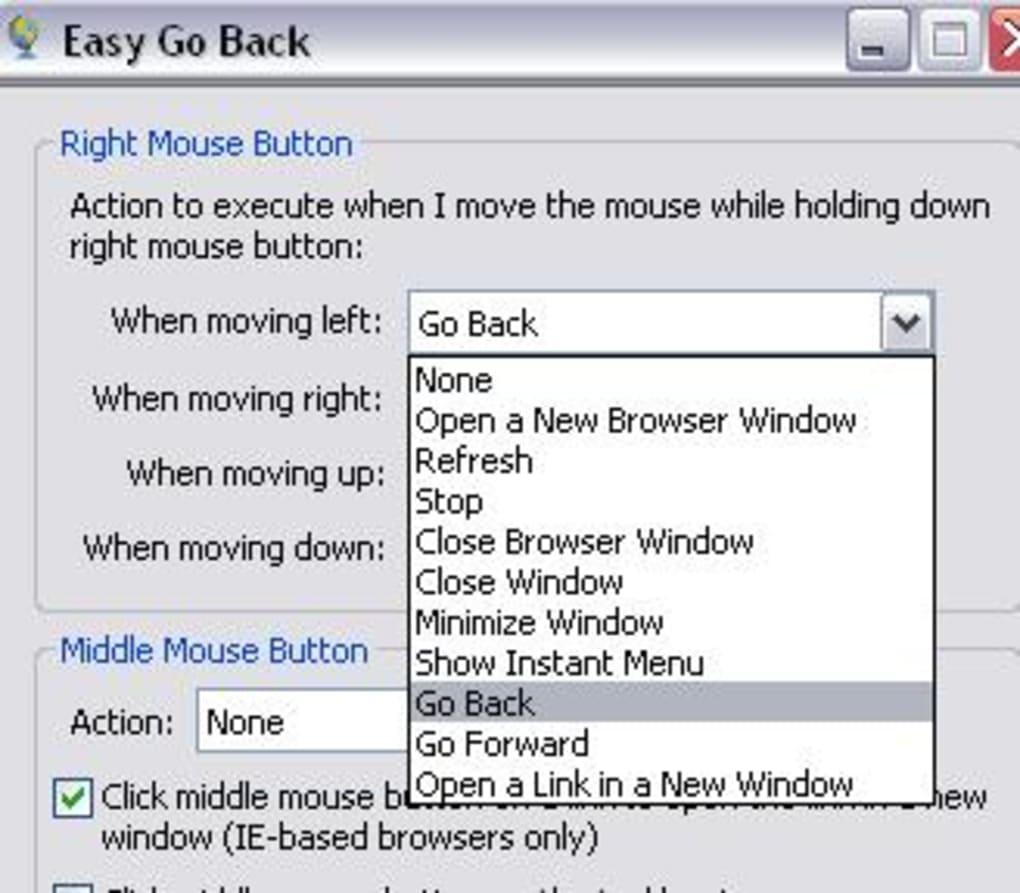
Once installed, the software redefines how you interact with Internet Explorer. The core functionality is simple: press and hold the right mouse button, then move the cursor left to go back and right to go forward. This intuitive design mimics natural hand movements, making navigation feel almost subconscious after a few uses.
What sets this tool apart is its minimal interference with normal mouse behavior. You don’t need to remember complex commands or change your entire workflow. The gesture only activates when you press and hold the right button—otherwise, your mouse functions as usual.
This means you can still drag, select, and right-click without any conflicts. The responsiveness is excellent, with near-instant page transitions, and the software runs quietly in the background. It’s particularly useful for researchers, content creators, and anyone who frequently jumps between articles, product pages, or documentation.
By reducing the number of clicks and keystrokes, you can save significant time over the course of a day. Plus, the interface is clean and unobtrusive—no pop-ups, no ads, and no unnecessary features that clutter your desktop.
For those who value efficiency and precision, Easy Go Back transforms browsing from a series of discrete actions into a fluid, continuous experience. It’s not just a convenience—it’s a productivity upgrade. Whether you're comparing prices, reading news, or navigating a long tutorial, the ability to go back and forth with a simple mouse motion keeps your focus on the content, not the navigation. The tool is also highly customizable, allowing you to adjust sensitivity and even disable certain features if needed. With a free download and no hidden costs, it’s one of the most practical browser enhancements available for Internet Explorer users.
Enhanced Features for Smarter Mouse Usage
Beyond its primary navigation feature, Easy Go Back comes packed with several additional tools that elevate your browsing experience. One standout feature is the ability to open links in a new window with a single middle mouse button click. This is especially helpful when you want to keep your current page open while exploring a related link.
The middle button acts as a smart trigger: if you click it over a hyperlink, it opens the link in a new tab or window. If you click it elsewhere—such as on the taskbar or blank area of the browser—it simply opens a new Internet Explorer window. This eliminates the need to hold the Shift key or right-click and select “Open in New Window,” making multitasking smoother and faster.
Another powerful addition is the Instant Menu, a context-sensitive shortcut that appears when you press and hold the right mouse button. This menu provides quick access to essential actions like minimizing the current window, closing it, opening a new browser window, or switching between Internet Explorer and Firefox (if both are installed). This feature is ideal for users who frequently switch between browsers or manage multiple windows simultaneously. It reduces the number of steps required to perform common tasks, saving valuable seconds throughout the day. For example, instead of navigating through menus or using keyboard shortcuts, you can simply use a quick mouse gesture to close a window or open a fresh tab.
These features are not just convenient—they’re designed with real-world usage in mind. The software is lightweight, consuming minimal system resources, and integrates seamlessly with Internet Explorer’s existing interface. It doesn’t slow down your browser or cause crashes.
The installation process is straightforward, and the program updates automatically to ensure compatibility with the latest versions of IE. While it’s currently exclusive to Internet Explorer, the functionality it offers is unmatched by most built-in navigation tools. If you’re a power user who values speed, precision, and control, Easy Go Back delivers exactly what you need—without the bloat.
Compatibility, Installation, and System Requirements
Easy Go Back is designed specifically for Windows-based systems and is fully compatible with all major versions of Internet Explorer, including IE 8 through IE 11. It supports both 32-bit and 64-bit Windows operating systems, making it accessible to a wide range of users. The software does not work with other browsers like Google Chrome, Mozilla Firefox, Microsoft Edge, or Safari. This limitation is important to note, especially if you use multiple browsers regularly. However, for dedicated Internet Explorer users, it’s a perfect fit.
Installation is quick and hassle-free. Simply visit the official download page, click the “Download” button, and run the installer. The setup wizard guides you through the process in under a minute.
Once installed, the program runs in the background and starts working immediately. There’s no need to restart your computer or configure complex settings. The default gesture (right-click and move left/right) works out of the box, but you can customize it via the settings panel.
You can adjust the sensitivity, change the trigger button, or disable features you don’t use.
System requirements are minimal: a modern Windows PC with at least 1 GB of RAM, 100 MB of free disk space, and a standard mouse with right and middle buttons. The software is lightweight and won’t impact your system performance. It’s also secure—no malware, no spyware, and no data collection. The developers maintain a clean reputation, and the software is regularly updated to fix bugs and improve compatibility. For users who rely on Internet Explorer for legacy applications, banking, or internal company systems, Easy Go Back is a reliable and safe enhancement.
Pros and Cons at a Glance
- Pros:
- Intuitive gesture-based navigation with right mouse button
- Open links in new windows with middle mouse click
- Instant Menu for quick window management
- Lightweight and fast, no system slowdown
- Free to download and use with no hidden costs
- Easy installation and automatic updates
- Secure, no malware or data tracking
- Cons:
- Only compatible with Internet Explorer (not Chrome, Firefox, or Edge)
- May cause accidental navigation when dragging or selecting text
- No mobile support (Android/iOS)
- Interface is minimal—no advanced customization options
- Not actively updated (last update several years ago)
Frequently Asked Questions (FAQ)
Is Easy Go Back free to download?
Yes, Easy Go Back is completely free to download and use. There are no premium features or hidden charges. The software is distributed without ads or trial limitations.
Does Easy Go Back work with Chrome or Firefox?
No, Easy Go Back is designed exclusively for Internet Explorer. It does not support Chrome, Firefox, Edge, or any other browser. If you use multiple browsers, you’ll need alternative tools for those platforms.
Can I customize the mouse gestures?
Yes, the software allows basic customization. You can adjust gesture sensitivity, change the trigger button, and enable/disable features like the Instant Menu or middle-click link opening.
Is the software safe to install?
Yes, Easy Go Back is safe and secure. It does not contain malware, spyware, or data trackers. The developers have maintained a clean reputation, and the software is regularly scanned for threats.
Do I need a special mouse to use it?
You need a mouse with a right button and a middle button (scroll wheel click). Most standard mice support these features. If your mouse lacks a middle button, some functions like opening links in new windows won’t work.
Final Verdict: A Must-Try Tool for IE Users
If you're still using Internet Explorer for work, legacy systems, or personal browsing, Easy Go Back is a game-changing tool that significantly improves navigation efficiency. Its gesture-based system is intuitive, responsive, and easy to adopt. The added features—like middle-click link opening and the Instant Menu—make it more than just a navigation helper; it’s a full productivity booster. While the lack of support for modern browsers like Chrome or Firefox is a notable drawback, it’s a fair trade-off for the seamless experience it delivers on IE.
For users who value speed, simplicity, and control, this free software is well worth downloading. It’s lightweight, secure, and designed to enhance, not disrupt, your workflow. Whether you're a student, professional, or casual user, Easy Go Back can save you time and reduce frustration during long browsing sessions.
Download Easy Go Back today and transform the way you navigate the web—effortlessly, securely, and with just a flick of your mouse.







